Windows really needs to ditch CRLF and just use LF, and switch from backslashes to forward slashes. Or better yet, just switch everything to full POSIX.
In powershell everything is much better than cmd, but it's just not enough.
WSL is generally great, but there are annoying downsides. I often get "catastrophic" crashes and the zone identifier files drive me nuts. Plus it takes so much longer to start VSCode when connecting with WSL, and now you've got two file systems. WSL1 was in many ways better than WSL2 for these reasons.
"UTF-16 is used by the Windows API, and by many programming environments such as Java and Qt. The variable-length character of UTF-16, combined with the fact that most characters are not variable-length (so variable length is rarely tested), has led to many bugs in software, including in Windows itself.
"UTF-16 is the only encoding (still) allowed on the web that is incompatible with 8-bit ASCII. It has never gained popularity on the web, where it is declared by under 0.004% of public web pages (and even then, the web pages are most likely also using UTF-8). UTF-8, by comparison, gained dominance years ago and accounted for 99% of all web pages by 2025."
NT shipped with USC-2 as UTF-8 (and -16) did not yet exist. USC-2 naturally translated to UTF-16, hence the choice. NT/Win32 is also designed for fixed-with code units, something UTF-8 doesn't support.
You can use UTF-8 on a per-application basis, within limits.
Linux kernel's ABI/API surface is completely byte-based and is tiny compared to Win32 API. The stable ABI of Windows is strictly in the user space and it covers the entire useful operating system. Don't forget that glibc isn't that ABI stable nor anything that goes all the way up to systemd/X11/gettext/Wayland/cairo/GTK/Qt/glade/Pipewire/xdg. Nothing equivalent in Linux environment is stable, especially compared against Win32 system libraries.
You encounter encoding requirements not in kernel system calls but in more user-facing sides of the OS. So your comparison should include all the userspace components of a Linux system (e.g. gettext), if you're considering the places where you encounter actual Unicode string-based operations where UTF-16 comes into play in Windows.
ALL OF THE equivalent Windows libraries (user32.dll, kernel32.dll, ws2_32.dll, shellex.dll ...) to the Linux ones I counted above and more are ABI and API stable.
Additional Detail: it is specifically utf-16 little endian when a byte order mark is not used, which is the opposite of the recommended choice of big endian in the RFC.
Worse are the byte order marks required to support both endians that end up in files.
The development of Windows NT based on UCS-2 precedes the RFC by roughly a decade, and little-endian was the natural choice for the Intel PC platform. Obviously the endianness had to remain the same when UCS-2 was extended to support UTF-16.
UTF-16 is also used by C#, Java, and JavaScript. Since JavaScript is so widely adopted, I wouldn't call it a rare bird. Not necessarily used when reading or writing files, but it's what's used internally for the strings. As a result, your strings use UTF-16 surrogate pairs to represent characters outside of the basic multilingual plane (such as Emoji).
UTF-16 is the internal format of the ICU library (International Components for Unicode, the support library from the Unicode standards people) which is a common way to add "full fat" Unicode support to a programming language. This has knock-on effects everywhere. If you're using ICU, you either use UTF-16, too, or you constantly convert back and forth every time you interact with ICU. You're often best off using UTF-16 in memory and only converting to UTF-8 when you write files or transmit over the network.
an interesting tidbit, some Windows kernel developer realized that most registry keys are ascii anyways so they could save up to 50% space simply by storing the name as ascii. The flag is called "compressed name" and they will pad with 0x00 when reading the name to make a proper utf-16 string.
> Or better yet, just switch everything to full POSIX.
Really not possible as most of POSIX semantics arise naturally from the kernel (or are enforced/executed at the kernel level). Windows technically provides some of them (or semantic equivalents) so you could make something work, but in order to do a full port you'd need to strip out too many concepts for it to be worthwhile. For instance the idea that "everything is a file" or the single root filesystem layout (which iirc is segmented deeply at the kernel level).
> Really not possible as most of POSIX semantics arise naturally from the kernel (or are enforced/executed at the kernel level).
The kernels undoubtedly take different approaches. But there's nothing in NT that strictly prohibits POSIX compatibility layers. As we see with the many compatibility layers that have existed for Windows over the years.
> For instance the idea that "everything is a file"
POSIX doesn't have a concept of "everything is a file". That's Plan 9. UNIX and POSIX actually made numerous concessions here and there are plenty of constructs that are not exposed as a file.
Windows does already abstract a few primitives as files too. In fact even DOS has the concept of device files, though in typical Microsoft fashion, it's implementation was a clusterfuck that took MS 40 years to fix.
> or the single root filesystem layout (which iirc is segmented deeply at the kernel level).
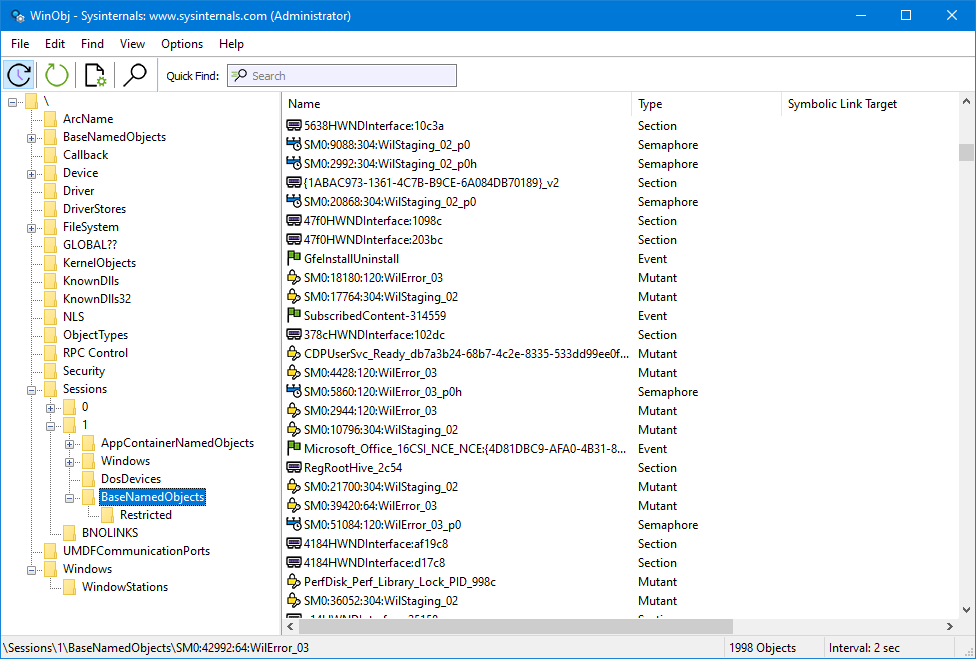
NT uses an object system for filesystem objects, but it still has a root. As you can see in the WinObj (eg screenshot below)
The C:\ convention is really more there for compatibility with DOS-lineage software but the underlying filesystem APIs work fine with NT objects.
For example, C:\foo.txt might be equivalent to \Device\HarddiskVolume3\foo.txt
In this regard, it's similar to how POSIX has a database of inodes and the filesystem hierarchy is actually just an abstraction that sits on top of that
> ... Or better yet, just switch everything to full POSIX.
Interix[0] did a pretty good job of this, but MSFT killed it. I was compiling GNU tools w/ GCC and running bash under Interix back in in 2000 under Windows 2000. It was grand.
Most (everything?) on Windows actually works with forward slashes. However, much of the tooling will overwrite your version with a backslash wherever it can.
The kernel and ntfs does not care about slash direction. Specific programs like dir might though and honestly if you're on windows just use powershell and avoid legacy cmd stuff.
The only times I can remember having line-ending issues is using GNU's tools on Linux. Every Windows tool I can remember using accepts both CRLF and LF.
Yesterday for me was the last time. Visual studio 2026 default to crlf I think maybe and I have autoctlf in git turned off. I should probably turn that back on.
A lot of tooling that generates or transform text-like files (e.g. XML) outputs native line endings, which in case of Windows is CRLF. Depending on what you do, it’s almost impossible to avoid that.
I have absolutely zero sympathy for any tool that is incapable of handling \r\n and only works with \n. Literally absolutely no sympathy.
All software accumulates warts over time. Linux is overflowing with horrible warts and tech debt. As is any software that has successfully served customers for decades.
But multiple line endings are quite possibly the easiest most trivial thing to support and there is absolutely no negative cost of any kind in doing so. Linux ecosystem chooses to be stubborn and provide a strictly worse user experience out of pure spite and for zero user benefit. It’s very irritating.
> But line endings are quite possibly the easiest most trivial thing to support and there is absolutely no negative cost of any kind in doing so. Linux ecosystem chooses to be stubborn and provide a strictly worse user experience out of pure spite and for zero user benefit. It’s very irritating.
The Linux ecosystem handles it fine (by using a single standard). Windows doesn't. That's its problem.
I didn't say it was the one and only True Way. My intended meaning - which I admit I may have poorly conveyed - is that tools from the unix ecosystem are intended to work on unix conventions, and do, and that works. Windows has different standards, which is also fine, but it follows that you shouldn't expect unix tools to follow Windows standards even if you make them run on Windows. This is like getting Windows software to run under WINE and then complaining that it doesn't use /n newlines and that it should change to accommodate Linux (or whatever). No, a Windows program will follow Windows standards even when made to run on a unix-like. And in the same way, unix-family software is going to follow unix standards even on Windows.
Multi-platform is very easy and a solved problem if you try juuuust a tiny amount.
For example the Rust stdlib iterator for lines() handles both conventions. It just works. Very easy.
I live in a cross-platform world. Line endings in text files should not be a breaking problem because some CLI tool refuses to support both. That’s just plain bad software engineering.
I expect Unix tools that process text files to be capable of supporting text files that have different conventions. This is very easy. Refer to previous comments on stubbornness out of spite.
Even Python has str.splitlines, which accepts a range of line separators (not just LF and CRLF), and the same when iterating over a file handle (which iterates over lines).
I think the point is that line endings are a really, really stupid hill for either Linux or Windows to die on. The day when any programs should have cared about line endings came and went decades ago.
Complete and utter nonsense. Every Windows tool I remember using has handled LF-only endings perfectly fine, meanwhile Linux tools regularly fail to handle CRLF endings.
"Windows really needs to ditch CRLF and just use LF, and switch from backslashes to forward slashes."
Hahahahaha. That's hillarious.
Oh god, you're serious?
Do you have any idea how much of Windows, and user software would break? Any idea at all?
You really want MS, who has built backwards compatibility as a core feature of Windows, to break countless thousands of pieces of software that run on it?
I'm sure there's some idealized fantasy in which that change gets wrapped in a neat little abstraction that prevents anything from breaking. I promise you, there is no way of encapsulating or abstracting that change that works for everyone.
If I could wave a magic wand and make it so without breaking it, I would. But it's a fantasy.
>> Windows really needs to ditch CRLF and just use LF, and switch from backslashes to forward slashes.
{To the extent such stuff is pragmatic:} I think we should switch to Pascal-style strings everywhere, and then have no need for having special-purpose characters like path separators (a path now being a list of strings).
powershell is good. its much better than unix's everything piped is Text idea. godawfull that. outputs being objects is a really solid take.
WSL is trash.
besides that, lf vs. crlf is silly as you mention but crlf is more logical considering what its implementing. that being said the notion of these control chars is already based on outdated and limited ideas.
if you want a consistent system to do things with dont pick a system which tries to be two systems.
Linux has wine. Windows has WSL.
I'd recommend BSD. any flavor will do.
might take some adjustments but you will have a more 'rational' system if that is what you desire.
Being able to go someoutput | Format-Table | Select ColumnName,ColumnName,CloumnName is great. Beats memorizing the output format of any specific command and trying to wrangle it with awk.
I'm a big Linux advocate with limited experience on modern versions of Windows, but PowerShell objects are great. So is the Unix way of doing text. I think the strengths of each approach are in different use cases. Unix style is better for interactive usage because it's fast, I can type df -h | grep /home very quickly. Object output is better for scripts that can, thanks to objects, store and operate on sensible data while Bash scripts do a lot of ad-hoc data extraction/reformatting with string expansion, awk and whatever else to get data to the next step in the script.
No, they need to ditch drive letters first. The NT kernel and NTFS don't even require them (I used to mount disks without drive letters back in the NT 4 era). They just don't care enough to get rid of this annoyance.
users , especially non-technical, find it highly useful in my experience. Is it a net positive to get rid of them, or will it largely only make developers happier ?
At the very least, drive letters do make SMB shares a bit simpler for the non technical folks. T:\MyData is easier for them than \\0010-somehost-win.site1.mycorp.loca\Share01\MyData\
I used to support a group of completely tech illiterate users in construction & manufacturing. Them figuring out T:\ was hard enough, ask them to type in a UNC path into the address bar in explorer and you get "Wtf is file explorer? Wtf is an address bar? Where is the backslash key??"


In powershell everything is much better than cmd, but it's just not enough.
WSL is generally great, but there are annoying downsides. I often get "catastrophic" crashes and the zone identifier files drive me nuts. Plus it takes so much longer to start VSCode when connecting with WSL, and now you've got two file systems. WSL1 was in many ways better than WSL2 for these reasons.